¶ Kill ASA, Create Firepower Threat Defense (FTD) & FXOS
Picture of the new world
Beware of ASA Platorm Mode, must always be FTD with FDM
¶ Password recovery
- Use light-blue cable to Console
- Verify that you can not log in
- reboot using power-switch on device
- Use Esc or BREAK signal or Ctrl + L to interrupt boot process and go into rommon 1 > prompt
- Type the command
factory-reset
Remember that the only allowed password is Network!337
There is no need to do full image reset (YT: Cisco video)
¶ Links: FTD and FDM  , absolutely not FMC
- Cisco FXOS Troubleshooting Guide for 1000/1200/2100/3100/4200 with Threat Defense
- Connect FTD -- Command Reference
- BAD: one-shot only: FTD 2100 Initial Setup https://www.cisco.com/c/en/us/td/docs/security/firepower/quick_start/fp2100/firepower-2100-gsg/ftd-fmc.html#Cisco_Concept.dita_1ab7122f-bfa6-47c5-bb8b-a8dcc0bb5938
- Not working: Fix ip of mgmnt interface: https://docs.defenseorchestrator.com/t_complete_initial_FTD_config_CLI_for_CDO.html
- BÄSTA SIDAN: configure FDM firepower-device-management
- BEWARE: DANGEROUS: Reimage Cisco FTD on 1000, 2100, and 3100 Series | Full Walkthrough & Best Practices (by Cisco)
- BEWARE: DANGEROUS: Another destroy 2100 (by Vijaykumar Vasoya)
- looong inital setup https://www.youtube.com/watch?v=-mzRctMg2pM
Rest API for FDM
- https://www.cisco.com/c/en/us/td/docs/security/firepower/ftd-api/guide/ftd-rest-api.html
YT: How to Configure a Network Object on FDM Using REST-API | Step-by-Step Guide (by Cisco)Follow the Video
- Click the /Objects\ tab and verify that there are NO "cisco-XXX" objects
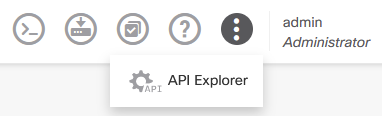
- Click on the three dots:
and select "API Explorer"- Scroll down to "NetworkObjects"
- Click "NetworkObjects" and select "/objects/networks"
- Please look at "example" and review parameters
- Paste modified data from below to the "Parameters"/"body" input textbox:
{ "version": "string", "name": "Cisco_host", "description": "RA-Cisco_managament-PC", "subType": "HOST", "value": "10.8.4.50", "isSystemDefined": false, "dnsResolution": "IPV4_ONLY", "type": "networkobject", }Click TRY IT OUT button and look for the Response Code 200
7. Go back to the normal GUI, click /Objects\ and verify your new object!
8. Happiness
9. Continue according to the video with a Network, not a Host
10. Done!!

¶ Random Commands ...
> show version
------------------[ firepower ]--------------------
Model                     : Cisco Firepower 2110 Threat Defense (77) Version 7.4.2 (Build 172)
UUID                      : 26d73360-3af6-11f0-9812-eb93422800fc
LSP version               : lsp-rel-20231011-1536
VDB version               : 376
----------------------------------------------------
Change IP: (command takes loooong time... Zzz)
firepower# connect ftd
> configure network ipv4 manual 193.10.203.173 255.255.255.128 193.10.203.129
Setting IPv4 network configuration...
management0 is configured for IPv6 DHCP, but no addresses found.
Should we change the MAC-address:
Platform FPR-2110 with 16384 MBytes of main memory

WARNING: This board is using a temporary MAC address.
WARNING: The temporary MAC address override value = 00:11:22:33:44:44
WARNING: Please clear this value to use the programmed MAC address.
WARNING: Use the following two CLI commands:
WARNING:   unset MACADDR
WARNING:   sync
Hitting ? to find commands
firepower#
  acknowledge     Acknowledge
  backup          Backup
  commit-buffer   Commit transaction buffer
  connect         Connect to Another CLI
  create          Create managed objects
  discard-buffer  Discard transaction buffer
  end             Go to exec mode
  exit            Exit from command interpreter
  scope           Changes the current mode
  set             Set property values
  show            Show system information
  terminal        Terminal
  top             Go to the top mode
  up              Go up one mode
  where           Show information about the current mode

firepower# connect
  ftd         Connect to FTD Application CLI
  local-mgmt  Connect to Local Management CLI
firepower# connect
ftd Connect to FTD Application CLI
local-mgmt Connect to Local Management CLI
firepower# connect ftd
>
  aaa-server                     Specify a AAA server
  activate-tunnel-group-scripts  Reload ASDM generated scripts for username-from-certificate
  app-agent                      Configure appagent features
  asp                            Configure ASP parameters
  attribute                      Modify a monitored attribute
  blocks                         Set block diagnostic parameters
  capture                        Capture inbound and outbound packets on one or more interfaces
  capture-traffic                Display traffic or save to specified file
  clear                          Reset functions
  cluster                        Cluster exec mode commands
  configure                      Change to Configuration mode
  conn                           Connection
  connect                        Connect to another component.
  copy                           Copy from one file to another
  cpu                            general CPU stats collection tools
  crypto                         Execute crypto Commands
  debug                          Debugging functions (see also 'undebug')
  delete                         Delete a file
  dig                            Look up an IP address or host name with the DNS servers
  dir                            List files on a filesystem
  dns                            List files on a filesystem
  dynamic-access-policy-config   Activates the DAP selection configuration file.
  eotool                         Change to Enterprise Object Tool Mode
  exit                           Exit this CLI session
  expert                         Invoke a shell
  failover                       Perform failover operation in Exec mode
  file                           Change to File Mode
  fips                           Execute FIPS tests
  fsck                           Filesystem check
  help                           Interactive help for commands
  history                        Display the current session's command line history
  ldapsearch                     Test LDAP configuration
  logging                        Configure flash file name to save logging buffer
  logout                         Logout of the current CLI session
  memory                         Memory tools
  more                           Display the contents of a file
  no                             Negate a command or set its defaults
  packet-tracer                  trace packets in F1 data path
  perfmon                        Change or view performance monitoring options
  pigtail                        Tail log files for debugging (pigtail)
  ping                           Test connectivity from specified interface to an IP address
  pmtool                         Change to PMTool Mode
  reboot                         Reboot the sensor
  redundant-interface            Redundant interface
  restore                        This command is used to restore FTD from sfr prompt
  sftunnel-status                Show sftunnel status
  sftunnel-status-brief          Show sftunnel status brief
  show                           Show running system information
  shun                           Manages the filtering of packets from undesired hosts
  shutdown                       Shutdown the sensor
  sync-from-peer                 Sync from peer FTD
  system                         Change to System Mode
  tail-logs                      Tails the logs selected by the user
  test                           Test subsystems, memory, interfaces, and configurations
  traceroute                     Find route to remote network
  undebug                        Disable debugging functions (see also 'debug')
  upgrade                        Install Upgrade Package
  verify                         Verify a file
  vpn-sessiondb                  Configure the VPN Session Manager
  webvpn-cache                   Remove cached object

> exit
firepower# connect local-mgmt
firepower(local-mgmt)#
  cd                Change current directory
  clear             Clear managed objects
  cloud             Cloud CDO Commands
  config            Configure the system
  connect           Connect to Another CLI
  consent-token     consent token
  copy              Copy a file
  cp                Copy a file
  debug             Debugging functions
  debug-peridot     Peridot Switch Debug Function
  delete            Delete managed objects
  dir               Show content of dir
  end               Go to exec mode
  erase             Erase
  erase-log-config  Erase the mgmt logging config file
  exit              Exit from command interpreter
  failsafe-exit     Exit from failsafe mode
  fips              FIPS compliance
  format            Format a disk
  ls                Show content of dir
  mkdir             Create a directory
  move              Move a file
  mv                Move a file
  no                No
  ping              Test network reachability
  ping6             Test IPv6 network reachability
  pwd               Print current directory
  reboot            Reboots Device
  rm                Remove a file
  rmdir             Remove a directory
  run-script        Run a script
  set               Set property values
  show              Show system information
  shutdown          Shutdown Device
  ssh               SSH to another system
  tail-mgmt-log     tail mgmt log file
  terminal          Terminal
  top               Go to the top mode
  traceroute        Traceroute to destination
  traceroute6       Traceroute to IPv6 destination
  verify            Verify

firepower(local-mgmt)#
The wroing way:
connect ftd
expert
admin@firepower:/usr/local/sf/bin$ cd /usr/local/sf/bin
admin@firepower:/usr/local/sf/bin$ sudo configure-network
Correct way:
> show network
===============[ System Information ]===============
Hostname                  : firepower
DNS Servers               : 208.67.222.222
                            208.67.220.220
                            2620:119:35::35
DNS from router           : enabled
Management port           : 8305
IPv4 Default route
  Gateway                 : 192.168.1.1

==================[ management0 ]===================
Admin State               : enabled
Admin Speed               : 1gbps
Operation Speed           : 1gbps
Link                      : up
Channels                  : Management & Events
Mode                      : Non-Autonegotiation
MDI/MDIX                  : Auto/MDIX
MTU                       : 1500
MAC Address               : E8:D3:22:8F:DB:80
----------------------[ IPv4 ]----------------------
Configuration             : Manual
Address                   : 192.168.1.254
Netmask                   : 255.255.255.0
Gateway                   : 192.168.1.1
----------------------[ IPv6 ]----------------------
Configuration             : DHCP

===============[ Proxy Information ]================
State                     : Disabled
Authentication            : Disabled
Change password:
scope security
show local-user
FPR-2100 /security # enter local-user admin
FPR-2100 /security/local-user # set password
Enter a password: cisco
Confirm the password: cisco
FPR-2100 /security/local-user* # commit-buffer
FPR-2100 /security/local-user # top
FPR-2100# -----
               Example for Firepower 2100 with FTD code
Firepower-chassis# connect ftd
> show user
Login UID Auth   Access Enabled Reset Exp       Warn   Grace MinL  Str Lock Max
admin 100 Local  Config Enabled    No Never      N/A               Dis No 0
qemu  994 Remote Basic  Enabled   N/A Never Disabled Disabled  0   Dis   No N/A
> configure user password admin
Enter current password: oldpassword
Enter new password for user admin: newpassword
Confirm new password for user admin: newpassword
=== Little Box fp1010 === === === ===
For the FPR-1010, you do not "boot into" Firepower, you boot into the Firepower eXtensible Operating System (FXOS) CLI and then connect to the Firepower Threat Defense (FTD) application
. If your device is currently running as an ASA, you will need to reimage it with the FTD software.
Firepower
https://www.lammle.com/post/quickly-move-from-asa-to-firewall-threat-defense-td-new-install/
ciscoasa# show version

Cisco Adaptive Security Appliance Software Version 9.18(2)
SSP Operating System Version 2.12(0.438)
Device Manager Version 7.18(1)152

Compiled on Mon 08-Aug-22 16:30 GMT by builders
System image file is "disk0:/installables/switch/fxos-k8-fp1k-lfbff.2.12.0.438.SP
A"
Config file at boot was "startup-config"

ciscoasa up 2 days 21 hours
Start-up time 0 secs

Hardware:   FPR-1010, 7184 MB RAM, CPU Atom C3000 series 2200 MHz, 1 CPU (4 cores
)

Encryption hardware device : Cisco FP Crypto on-board accelerator (revision 0x11)
                             Driver version        : 4.11.0
                             Number of accelerators: 6

 1: Int: Internal-Data0/0    : address is 00a0.c900.0000, irq 10
 3: Int: Not licensed        : irq 0
 4: Ext: Management1/1       : address is d0dc.2cb6.fb01, irq 0
 5: Int: Internal-Data1/1    : address is 0000.0100.0001, irq 0

License mode: Smart Licensing

Licensed features for this platform:
Maximum Physical Interfaces       : Unlimited
Maximum VLANs                     : 60
Inside Hosts                      : Unlimited
Failover                          : Disabled
Encryption-DES                    : Enabled
Encryption-3DES-AES               : Disabled
Security Contexts                 : 0
Carrier                           : Disabled
AnyConnect Premium Peers          : 75
AnyConnect Essentials             : Disabled
Other VPN Peers                   : 75
Total VPN Peers                   : 75
AnyConnect for Mobile             : Enabled
AnyConnect for Cisco VPN Phone    : Enabled
Advanced Endpoint Assessment      : Enabled
Shared License                    : Disabled
Total TLS Proxy Sessions          : 160
Cluster                           : Disabled

Serial Number: JAD274304RW
Configuration register is 0x1
Configuration last modified by enable_1 at 09:51:33.014 UTC Thu Oct 23 2025
ciscoasa#
ciscoasa# dir

Directory of disk0:/

268591913  drwx  4096         11:54:04 Oct 23 2025  log
805756537  -rw-  110401360    16:37:15 Aug 08 2022  asdm.bin
2      drwx  4096         08:36:40 Apr 11 2024  cores
805763761  -rw-  1028         12:25:24 Oct 20 2025  asa-cmd-server.log
805763768  -rw-  0            09:57:48 Oct 16 2025  coredumpfsysimage.bin
2      drwx  4096         08:36:40 Apr 11 2024  coredumpfsys
805763804  -rw-  39           12:25:23 Oct 20 2025  snortpacketinfo.conf
805763802  drwx  6            09:58:45 Oct 16 2025  packet-tracer
537181687  drwx  22           09:58:45 Oct 16 2025  smart-log
805763749  drw-  26           09:59:16 Oct 16 2025  coredumpinfo
805763747  drwx  6            09:57:47 Oct 16 2025  fxos
268591873  -rw-  1529         09:57:46 Oct 16 2025  cspCfg.xml

5 file(s) total size: 110403956 bytes
16106127360 bytes total (15762255872 bytes free/97% free)

ciscoasa#
-
Find the Firepower Threat Defense software for your FPR-1010 model. The image file will typically have a name like cisco-ftd-fp1k.SPA
-
dir
-
At the ciscoASA# prompt, use the download image command to start the process. Example for SCP:
download image scp://>username>@>your_ip_address>/path/to/cisco-ftd-fp1k.SPA -
After the download is complete, install the software with the install security-pack command.
-
Reboot and complete setup
Reboot the FPR-1010. It will now boot into the FTD image.
¶ Packet-Tracer: Test with * fake * packet
ping
     packet-tracer input ?
         hr-vlan    fghdfghdfghdfgh
         outside    dfghdfghdf ghdfgh
     packet-tracer input hr-vlan ?
         icmp       Enter this keyword if the trace packet is ICMP
         tcp        Enter this keyword if the trace packet is TCP
         ucp        Enter this keyword if the trace packet is UDP
     packet-tracer input hr-vlan icmp ?
         A.B.C.D    Enter SOURCE address if ipv4
     packet-tracer input hr-vlan icmp 192.168.13.10 ?              ! <--- Address of inside MLS on network hr-vlan
         use 8 for PING (icmp-echo-request)   add 0 for subtype 0
     packet-tracer input hr-vlan icmp 192.168.13.10 8 0  ?
         A.B.C.D    Enter SOURCE address if ipv4
     packet-tracer input hr-vlan icmp 192.168.13.10 8 0 1.1.1.1
Phase: 1
Type: CAPTURE
Subtype:
Result: ALLOW                                                  <======= Still alive
Config:
Additional Information:
 Forward Flow based lookup yields rule:
 in  id=0xd793b4a0, priority=12, domain=capture, deny=false
        hits=621531641, user_data=0xd7bbe720, cs_id=0x0, l3_type=0x0
        src mac=0000.0000.0000, mask=0000.0000.0000
        dst mac=0000.0000.0000, mask=0000.0000.0000
Phase: 2
Type: ACCESS-LIST
Subtype:
Result: ALLOW                                                  <======= Still alive
Config:
Implicit Rule
Additional Information:
 Forward Flow based lookup yields rule:
 in  id=0xd7dc31d8, priority=1, domain=permit, deny=false
        hits=23451445222, user_data=0x0, cs_id=0x0, l3_type=0x8
        src mac=0000.0000.0000, mask=0000.0000.0000
        dst mac=0000.0000.0000, mask=0100.0000.0000
Phase: 3
Type: ROUTE-LOOKUP
Subtype: input
Result: ALLOW                                                  <======= Still alive
Config:
Additional Information:
in   10.15.216.0     255.255.252.0   inside
Phase: 4
Type: ROUTE-LOOKUP
Subtype: input
Result: ALLOW                                                  <======= Still alive
Config:
Additional Information:
in   0.0.0.0         0.0.0.0         outside
Result:
input-interface: inside
input-status: up
input-line-status: up
output-interface: inside
output-status: up
output-line-status: up
Action: drop
Drop-reason: (rpf-violated) Reverse-path verify failed
The following example traces a TCP packet for the HTTP port from 10.100.10.10 to 10.100.11.11. The result indicates that the packet will be dropped by the implicit deny access rule:
¶ Next fake packet: web
Use putty -> serial cable -> Command "connect ftd"
Test to surf to 10.100.11.11 on port 80, from 10.100.10.10
packet-tracer input outside tcp 10.100.10.10 61337 10.100.11.11 80
Phase: 1
Type: ROUTE-LOOKUP
Subtype: Resolve Egress Interface
Result: ALLOW                                                  <======= Still alive
Config:
Additional Information:
found next-hop 10.86.116.1 using egress ifc  outside
Phase: 2
Type: ACCESS-LIST
Subtype:
Result: DROP                                                  <======= Here the packet is killed !!!
Config:
Implicit Rule
Additional Information:
Result:
input-interface: outside
input-status: up
input-line-status: up
output-interface: NP Identity Ifc
output-status: up
output-line-status: up
Action: drop
Drop-reason: (acl-drop) Flow is denied by configured rule