¶ User Authentication
WORK FINISHED - Final Update 15/10 08:15
User database: change your password:
Question In how many places do need to change your password if you want to change them for Canvas, Student-LADOK and XXXX)
Question
From Darknet you have discovered the following excerpt of a cisco router of one of the major ISP's in Sweden.
username amina password 0 S3cr3tw0rd
username basil password 7 08065E1648290A190B454C
username callan secret 5 $1$Uxvj$Svo9IuN9yIz8mxzjEN/l31
username edmund secret 9 $9$M58t/LypTk1kFk$VPcSlw4hmAPmJn5MPupdKBfx.d6GKO4EJjU77PpR5WE
key config-key password-encrypt MasterKey
username griffin secret 8 $8$7aEgp82GNeRhA.$ei9w0LXMPIQmkK.vkX9bJ0vlbvkJwB.XsskvNy8WpSg
username nadia password 6 ^^CM`ADdW^Kg]ZK`BHdTeWObYCiSBDFBC
a/ Which passwords can be cracked in a reasonable amount of time?
b/ Challenge: how many of them can you crack?
Question
a/ What are the Password requirements for hv.se?
b/ How does that impact brute-force attacks according to van Oorschot compared to a freely chosen password? (remember to reference)
Question Read Chapter "3.3 Account recovery and secret questions" of van Oorschot.
a/ What is the password recovery mechanism of hv.se?
b/ What are the two tokens required for password-recovery of hv.se?
FORBIDDEN = ILLEGAL
Do not run https://www.ldapadministrator.com/download.htm in an IT-department computer room, to see if you can view information about other IT-usersYOU WILL BE PROSECUTED by the University
Question Create a new connection to the hv-open wifi network:
a/ Looking at the login splash; which system does this check?
b/ Why have the IT department choosen not to include Username and Password??
c/ Try to buy something and fail -- Question: Draw in diagrams.net a network diagram include most of:
☁️  (Internet),
🏢  (Office) ,
🔥  (Firewall) ,
🏪  (webshop),
📰  (Tabloid aka expressen.se)
👨💼👩💼🏛️ (University Management)
Please draw a network topology of everything that your "purchase data packet" traverse. Also show clearly where the purchase is stopped.
d/ What (very social) asset is protected here??
e/ Where is the actual protection taking place in the topology you draw? Close to the webshop, or close to the University??
¶ MFA - Multi Factor Authentication
Question
a/ Which authenticator is used in combination with outlook.com/hv.se
b/ Give other examples of Athenticators for other systems (create account on WoW, www.forticloud.com, etc etc)
c/ are there any open source autenticators that you can use with some of the above mentioned systems?
d/ Given the three systems "VPN tunnel", "Username & Password" and "Multi Factor Authentication"; why have the IT-department chosen not to incorporate VPN in the protection of student emails?
e/ What implications could there be if the IT-department would require VPN for reading student emails?
¶ Lab on FortiGate Cyberwall (Version 7.4)
x FortiGate lab: Create local users
x FortiGate lab: protect users from youtube; only authorized have access
x FortiGate lab: protect network from users; only authorized have access
¶ Lab 4 – Authentication
In this lab you will work with Local-GUI authentication and securing web-pages on the internet with passwords. Usernames and passwords will either be stored locally on the FortiGate (Optionally: and stored remotely on a UserDatabase-server).
¶ Part 0: Cabling
-
Connect two PCs to LAN-ports; One Called “Server”, one called “Client”
-
Connect the WAN-port to the CNAP (Internet) switch)
-
Double check that ONLY the FortiGate WAN port is connected to the CNAP-switch, otherwise you destroy the complete CNAP-network
¶ Part 1: Restrict Access to the FortiGate GUI with Username and Password
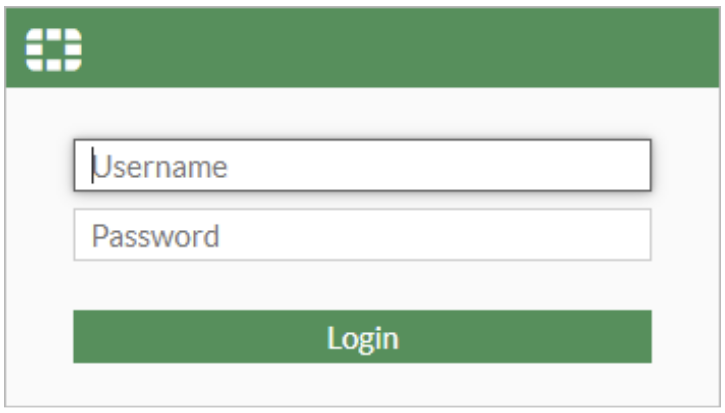
-
Create 3 User Definitions (amina, basil and callan) locally on the FortiGate with the password Network!337. Take a note of the "Ref." count
-
Create a new System Administrator called "hercules" with the password Network!337.
Put hercules in appropriate groups (profiles) -
Logout and then login again using username hercules
OPTIONAL TASKS:
14. Install WinRadius or OpenRadius on the PC called “Server”
15. Create three users “kim”, “johan” and “robert” with passwords Network!337 in the radius database
16. Login to FortiGate using the “johan” account
17. Change the user's password in the radius server
18. Logout and login again using the “johan” account
¶ Part 2: Restrict Access to a Web-Page using Username and Password
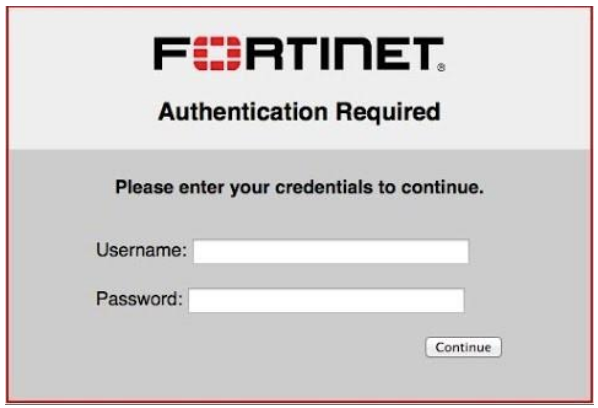
Using the local userdatabase of the FortiGate.
Protect the web-page www.cisco.com from random usage from your Local-PC (“Client”) by requiring Username Password and:
- Change "Firewall Policy" "View" to "By Sequence", not "Interface Pair View" .
No grey lines should be visible. - Create 2 policies; first allow users, then deny everyone else

Do NOT use your own IP address of cisco.com; use the "Internet Service" Cisco-Web" supplied by Fortinet. - Add in CLI:
config user setting
set auth-on-demand always
end
-
In the web browser on Local-PC go to www.cisco.com
-
Type a bad/unknown username password combination and you will be denied access to the cisco web-page
-
Type a correct Username Password and you will gain access to www.cisco.com
-
a/ On the LAN interface (Network>Interfaces) enable "Device Detection"
b/ on all windows machines do:IPCONFIG /RENEWin CLI so the FortiGate has a chance of detecting Name and OS of your device
c/ In which dashboard can you see what client information is associated with the username of previous login for www.cisco.com
d/ Can you create a rule that you are only allowed to see www.cisco.com if you are using a Windows machine, not Linux ???!?
e/ if you create a second policy for InternetService:Dell-Web do you have to login every single time, or do you only login once for all sites? Try it! -
Create two rules:
25.1 a rule for callan so he can freely visit sites and pages on SUNET (192.168.0.0/16)
25.2. but is reqired "Internet Login" for any site outside SUNET
OPTIONAL TASKS:
27. Now try to do the same, but with a username from the Radius server
28. Can you protect all the pages www.dell.com, www.cisco.com, www.hp.com with a > single authentication (Type username password once(1) and access three(3) webpages)?
29. Same as above, but also deny “kim” access to www.cisco.com
Question In the firewall part above: explain where you used MAC, DAC, RBAC or ABAC and motivate why your classification is correct and should not be one of the other
¶ Report
In the report that you hand in, please answer only Questions above, and tell me what you have learned.
The FortiGate Lab stuff is only there to help you understand Users in a cybersecurity perspective.
¶ Cleanup!
-
Erase the FortiGate, so it is clean for the next group, by pressing the >_ icon (top right corner)
Type:execute factoryreset -
Put back all cables, both at your workstation as well the ones in the FortiGate/Cisco booth. Also put back any USB memories at their parking space.
-
Turn off your FortiGate/Cisco equipment with the RED power switch. (Listen for silence
 )
)
¶ END OF LAB
|
CLIENTS 👨👩👦 |
GUARDS Checkpoint ♀️ ⚔️ 🚦 INSPECTION 🛢️ 🔬 |
HAZARDS 🦇 |
End Goal |
TOKEN |
OTHERS 🗃️ 🔐 🌏 ⚙️ 🙅♂️ 📂 🇸🇪 👩🏫 |


 -""-
-""-


 DATABASE ?? 🛢️Oil Drum


 MitM-attack ??
 true
true


 true
true


 📇
📇  🗂️
🗂️ 

 impersonator


 vs 🌐
vs 🌐 
 true
true
hej
hej