¶ Mitigate Web Attack (Flow Based)
End Goal
* set up a bad web-server (example webgoat or DVWA) and perform a “SQL-injection” or “Cross site scripting” → succeed with attack
* Protect the bad web-server with NGFW FortiGate again and perform a “SQL-injection” or “Cross site scripting” → Fail! (now protected)
Read (& Learn) Before the Lab
- https://securingninja.com/dvwa-hacking-tutorial/ "DVWA Hacking Tutorial"
- https://www.sprocketsecurity.com/resources/owasp-top-10-risks-of-2022 "A Showcase of the Top OWASP Risks"
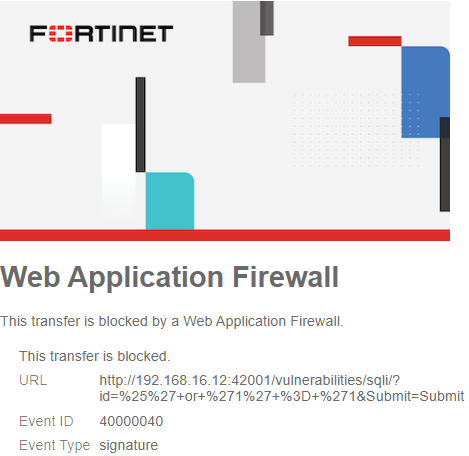
Inspirational Picture:
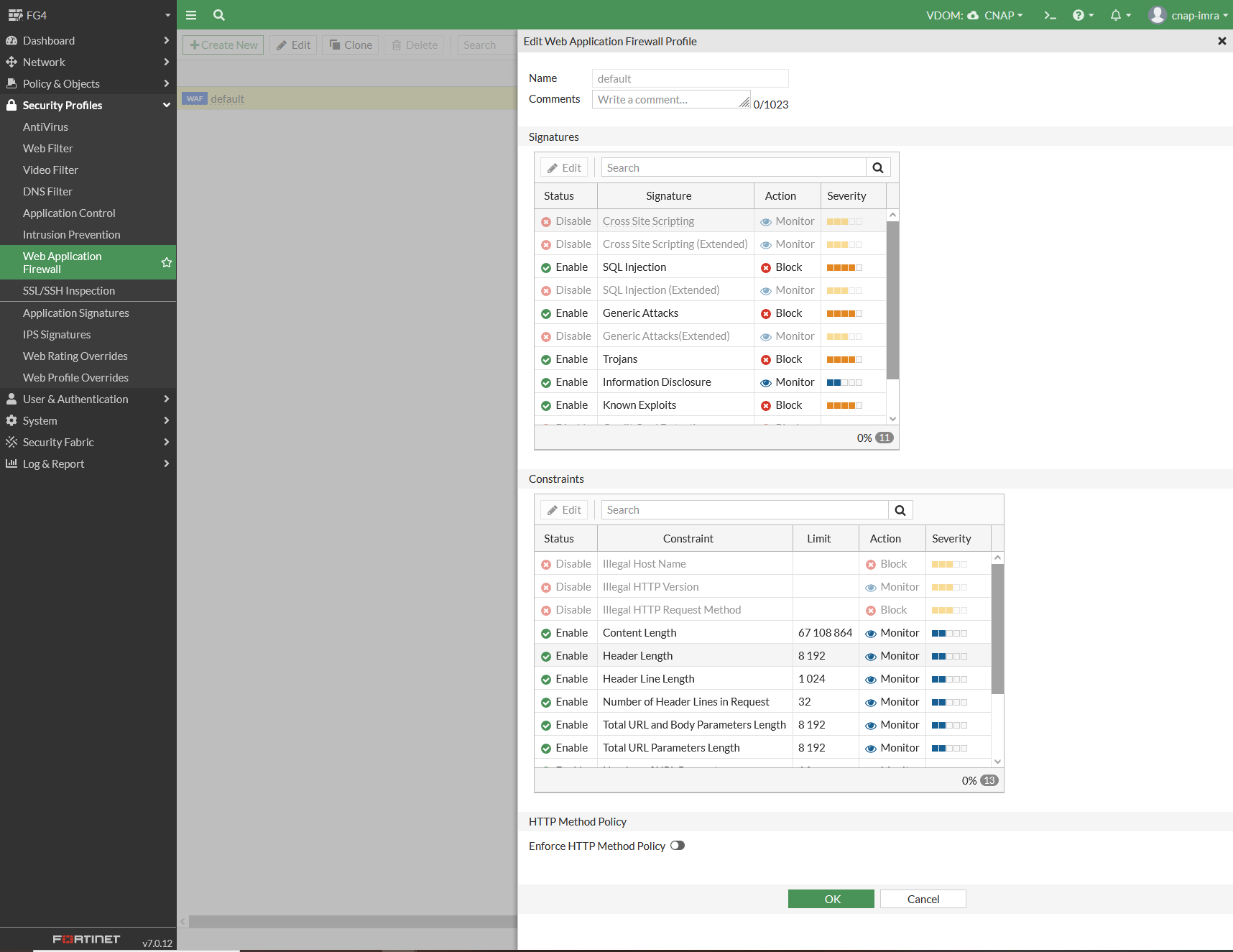
Fortigate Web Application F (WAF) screenshot
Please note “Signatures” and “SQL injection” above
BAD: https://www.youtube.com/watch?v=E4qwpBxH5b4 Web application firewall (WAF) - firewall training
Good: https://www.youtube.com/watch?v=TYdzj1XMMAI
How2 nuke FortiGate & and make it commit to ACL changes: Dashboard > FortiView Session > End Session: All

¶ Lab Setup
Two persons in each group.
Three computers from the same POD.
¶ 1a. Topology
Below is a picture of the NG-firewall that you will use. Please go and find it in your POD. It is forbidden to use NGFW's from other POD's.
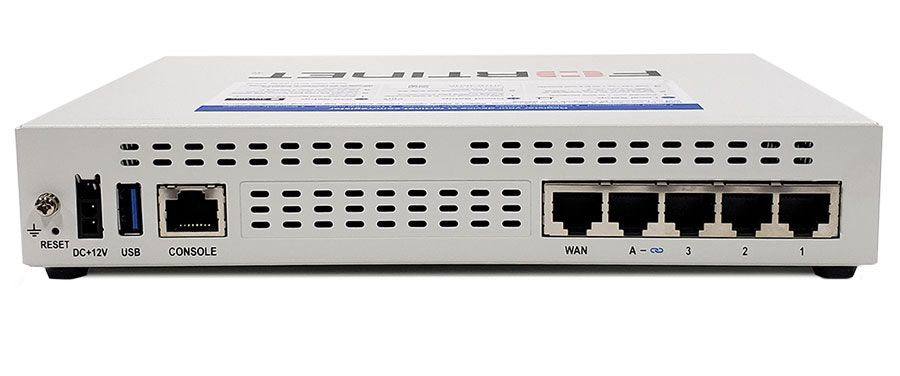
Cable according to the below topology
- Connect Kali-PC to Fortigate-Port1 via wall
- Connect Fortigate WAN-port to "Internet"-switch (rightmost ports)
- Connect Windows-PC to "Internet"-switch (rightmost ports) via wall
¶ 1b. Test connectivity
- On Attacker-PC: test the web browser for Internet-connectivity
- On Vulnerable-PC: type
ipconfigto find out what XX is in the 192.168.1.XX address of eth0-interface - On Vulnerable-PC: test the web browser for Internet-connectivity
¶ 2a. 🐧 Install WSL -- Windows Subsystem for Linux (no linux yet)

-
Go to the computer with green tape. That one has 32 GB RAM
-
Start a powershell command prompt (not a CMD window)
-
is it installed:
wsl --status -
NOT WORKING: List possible distributions: wsl --list --online
-
INSTALL:
wsl --install -d kali-Linux
Ignore the Welcome to ..." window; click X -
Select username
ciscowith passwordNetwork!337 -
Configure Networking
edit c:\Users\cisco\.wslconfig(Don't forget the dot.)
[wsl2]
networkingMode=mirrored

[experimental]
hostAddressLoopback=true
-
REBOOT Windows
-
(Windows icon) Start Menu -> (Ugly Penguin) WSL
If it does not work, continue with Install ... below
¶ 2b. Install WSL kali-linux
In powershell command prompt (not a CMD window):
wsl --list- (nothing installed !?!); then
wsl --list --online wsl --install --distribution kali-linux
Use Username: kali Password: Network!337
(Always use that password when you choose yourself!)
- Start WSL Kali terminal (Windows menu and click
 WSL (not "WSL Settings") )
 sudo nano /etc/wsl.conf
Make sure that it says
[boot]
systemd=true
- Shutdown wsl with powershell command:
wsl --shutdown(orsudo shutdown nowinside kali)
¶ 2c. Fix inbound firewall for WSL
Start Powershell as Administrator (right click on icon, run as admin)
Set-NetFirewallHyperVVMSetting -Name '{40E0AC32-46A5-438A-A0B2-2B479E8F2E90}' -DefaultInboundAction Allow

 Get-NetFirewallHyperVVMSetting -Name '{40E0AC32-46A5-438A-A0B2-2B479E8F2E90}'
¶ 3. Install DVWA into Kali Linux
Install DamnVulnerableWebApplication (dvwa) into Kali-Linux
-
Start a WSL Kali prompt-window, if you not already have done that
-
sudo apt-get update -
sudo apt-get install dvwa -
sudo systemctl start dvwa.service -
Using windows OS: surf to http://127.0.0.1:42001
-
Troubleshoot shared networking and port mappings:
PowerShellGet-NetTCPConnection -State Listen | Select-Object LocalAddress, LocalPort, OwningProcess | Sort-Object LocalPort
Kali-Linuxsudo ss -tlnp
FIX ACCESS RULES WITH:
sudo systemctl stop dvwa.service
sudo nano /etc/dvwa/vhost/dvwa-nginx.conf
change two occurrences of “deny all” to “allow all”
sudo systemctl start dvwa.service
- surf to 192.168.1.XX:42001
ONLY for Robert, do not try
PowerShell as Admininstrator
netsh interface portproxy add v4tov4 listenport=42001 listenaddress=0.0.0.0 connectport=42001 connectaddress=127.0.0.1
netsh interface portproxy show all
PS C:\WINDOWS\system32> Restart-Service iphlpsvc -Force
¶ 4. FortiGate - Initial Setup
This is the actual lab: previous things where only initial setup/prerequisites
Do not do the inital setup; press Later , Disable , Don't or Optimal .
- Use Vulnerable-PC to surf to https://192.168.1.99 (or whatever Linux command ip route ↲ (Windows: ipconfig /all ↲) tells you that the default gateway is)
- Login with username admin and blank password
- Change password to Network!337!! (Needs two more "!" to be long enough)
- Change the hostname to forti-pod-X where X is the pod the NGFW is in (look at the top of the rack)
- Check FortiGate version in the lower left corner if the Web-GUI; only version 7.6.x and higher works with this lab
(in 2023 it was Fortigate model 40F with 7.3.6 and now, due to 2GB restrictions in 50G, we are in flow-mode, not proxy mode ) - For convinience of not logging in all the time: System > Settings > Idle timeout: 300 minutes. Don't forget Apply
- Go to ↕️↔️ Network > Interfaces. Locate WAN interface and write down the address (should be 192.168.16.xx)
¶ 5. FortiGate - Port Forward
https://getlabsdone.com/how-to-configure-fortigate-port-forwarding/
The topology is as depicted in the diagram below:
NAT works very well for the "inside" kali-PC to access the Internet, but no one on the "outside" (Internet) can reach the kali-PC. TCP session are only one way.
Lets fix it with Port Forwarding that lends a TCP port of the fortiGate, and routes that traffic to the Inside.
-
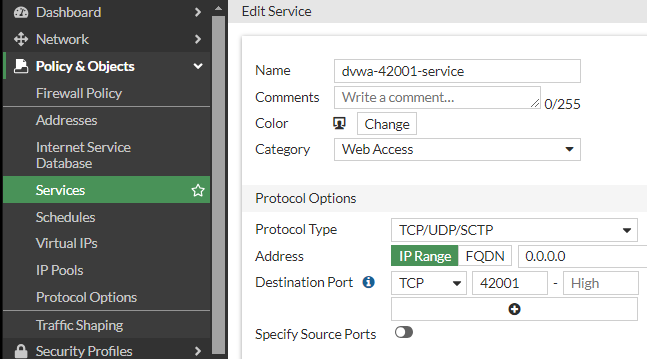
Go to 📄Policy & Objects > Services: Create New Service "dvwa-42001-service" //Category: WebAccess // DestinationPort:TCP:42001 42001
-
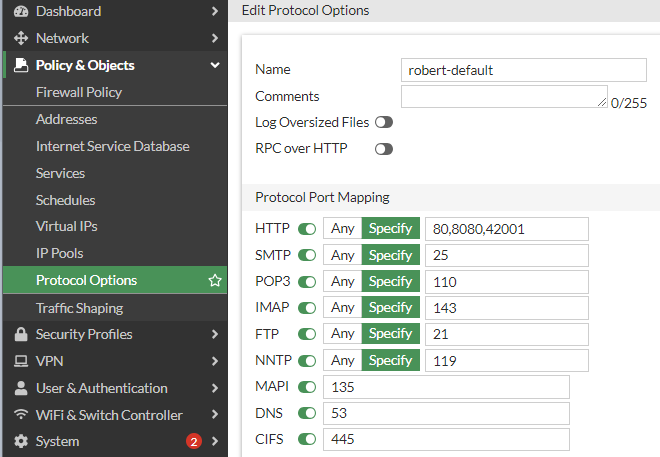
Go to 📄Policy & Objects > Protocol Options: Clone "default" and create "robert-default"
-
Edit "robert-default: and change http "80" to "80,8080,42001"
Blog-NonStandardPortInspection
-
Go to 📄Policy & Objects > Virtual IP: Create New VIP "dvwa-vip" // External:192.168.16.__ // Map To: 192.168.1.__ Enable PortForwarding: Tcp: OneToOne: 42001,42001
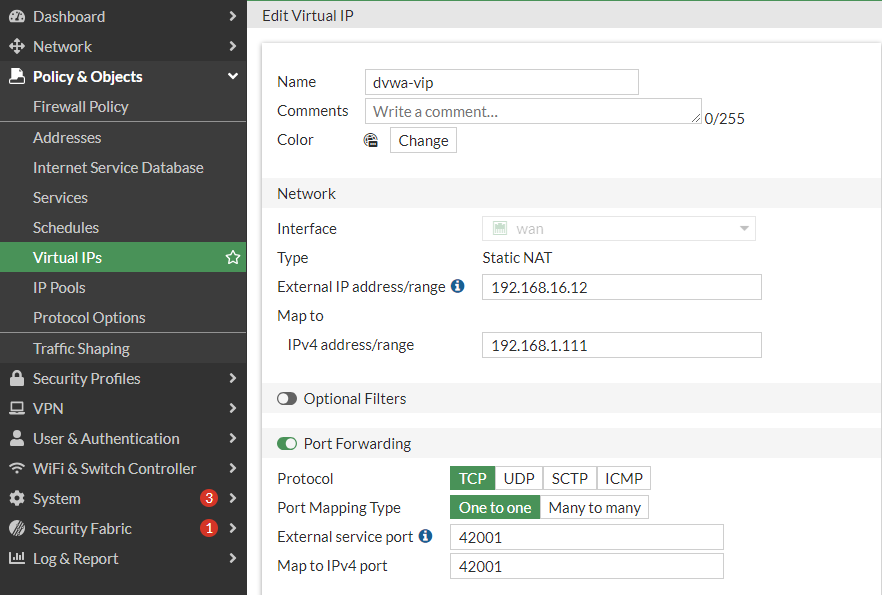
-
Combine these three with some more data, and create a Policy:
Go to 📄Policy & Objects > Firewall Policy: Create New Policy "allow-dvwa-policy" that uses "dvwa-service" and "dvwa-vip"
Remember that dvwa uses port# 42001 for http traffic, not 80
⬇️
58 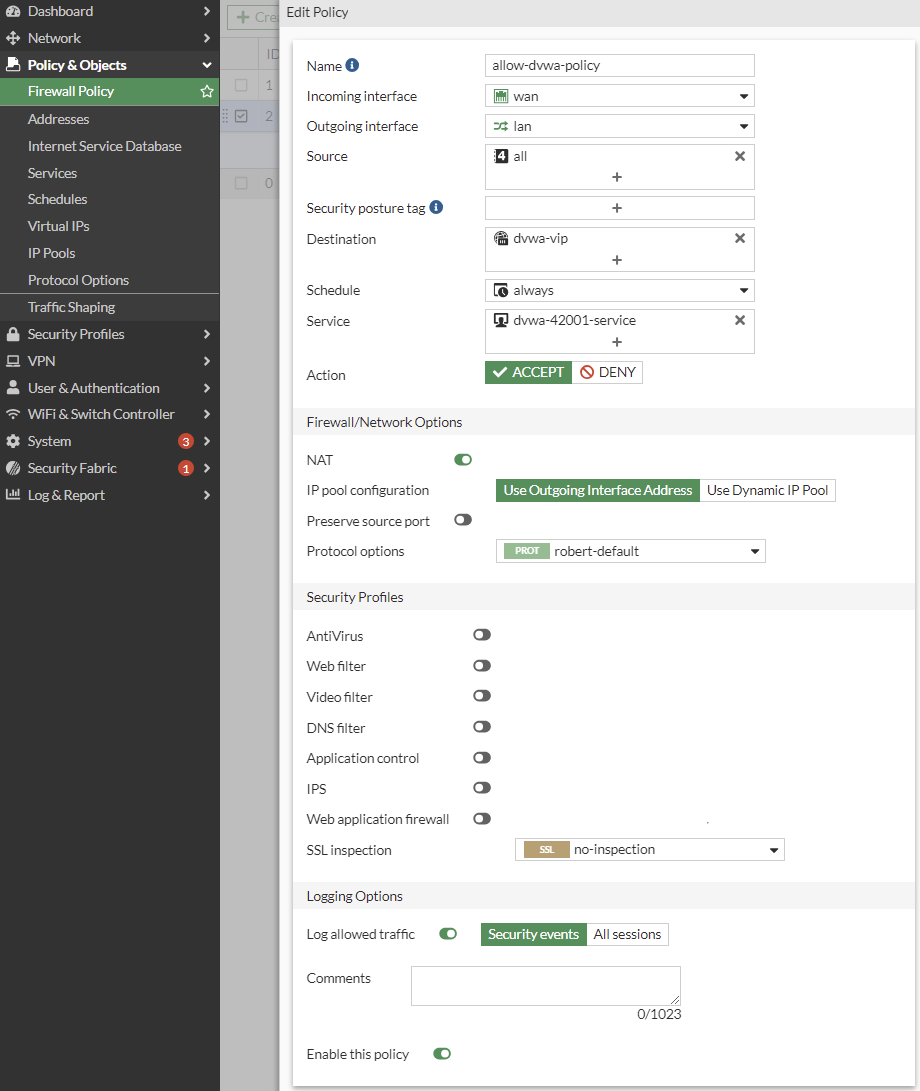
⬇️

- Cahnge Layout to: "By Sequence". Drag the new rule to the top using the ::: symbol
¶ 6. Attack DVWA (Attack Successful)
-
Access DVWA from the outside Windows PC (Attacker) with http (not https) using the URL http://192.168.16.XX:42001
Login credantials are: Username: admin Password: password -
Troubleshoot Port-Forward NAT in FortiGate if you can not see the http web-page
-
Go to DVWA Security: Change Security Level to "low"
CROSS SITE SCRIPTING (XSS) ATTACK -
Go to XSS (reflected) and enter Robert
-
Go to XSS (reflected) and enter <Script>alert("hacked by Robert")</Script>
Read more: https://tanmay26.medium.com/cross-site-scripting-xss-dvwa-damn-vulnerable-web-applications-36808bff37b3 -
Question 0 What did you learn from doing a XSS attack?
SQL INJECTION ATTACK -
Got to Setup/Reset DB: Click button "Create/Reset Database"
-
Go to SQL injection and enter 1
-
Go to SQL injection and enter %' or '1' = '1 Beware of the difference of ', ` and ´ characters :- )
Read more: https://medium.com/@tafiaalifianty/low-level-sql-injection-in-dvwa-41928b7206c6 -
Question 0 What did you learn from doing a SQLi attack? what learning difference from XSS??
¶ 7. Fortigate - Web Application Firewall
N/A; not enough RAM: FortiGate / FortiOS 7.6.6 Administration Guide Protecting a server running web applications
- 🔒Security Profiles > Intrusion Prevention
- Click [Create New] in IPS
- Type a name: "Webbb protection via IPS"
- (again) Click [Create New] in "IPS Signatures and Filters"
- Action: Block
- Packet Logging: Enable
- Status: Enable
- In "Filter" click "+" and add " TGT Server", " VULN XSS" & " VULN SQL Injection"
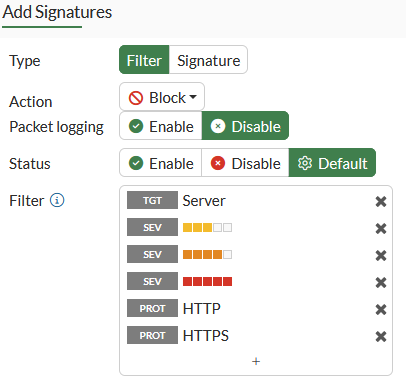
- Click OK
- Click OK
- Go back to "📄Policy & Objects > Firewall Policy" and edit your NAT Policy
- Enable IPS
- Change IPS to "Webbb protection via IPS"
- Change SSL Inspection to "certificate-inspection"
- Verify "Log allwed traffic" is ON and "All Sessions"
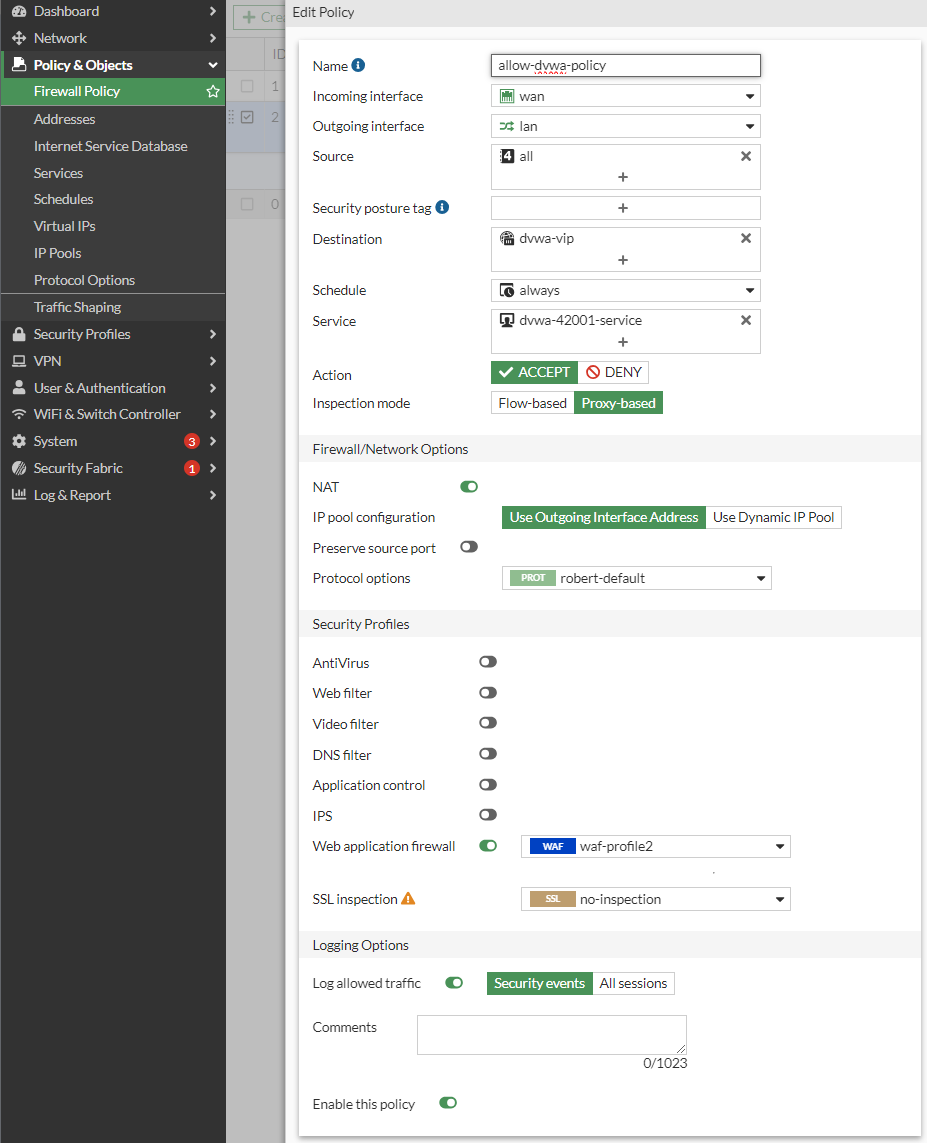
¶ 8a. Attack DVWA (Attack Mitigated)
-
Access DVWA from the outside Windows PC with http (not https) using the URL http://192.168.16.XX:42001
-
Troubleshoot Port-Forward NAT if you can not see the http web-page
-
Go to DVWA Security: Change Security Level to "low"
SQL INJECTION ATTACK
87.1 Got to Setup/Reset DB: Click button "Create/Reset Database"
87.2 Go to SQL injection and enter 1
87.3 Go to SQL injection and enter %' or '1' = '1 Beware of the difference of ', ` and ´ characters :- )
Read more: https://medium.com/@tafiaalifianty/low-level-sql-injection-in-dvwa-41928b7206c6
88. Question What did you learn now?
The Splash-Picture will *NOT appear
- Go To Policy & Objects > Firewall Policy
Right click on your NAT rule (the one with IPS) and select "Show Matching Logs"
You Might want to click on the ▼funnel besides "Result" and filter on "Deny"
90. Open (doubleclick) one Deny-line, and look Under "Action": Was the ActionAction "Client-Reset" or "Blocked" ?
91. Question What did you learn now?
An alternative way to look at the logs are: Logs & Report > Forward Traffic

¶ 8b. More Attacks
Try one, or more, of the following. Then try to block the attack in the firewall (and probably fail)
Answer It is really hard with a low budget cyberwall that is resource constrained and only runs in flow-mode, not proxy-mode, to mitigate all web attacks; the end goal is to be protected from the unknown, not known attacks, by the use of subscriptions of updated rules & signatures.
Question Why is it such a difference between proxy-mode and flow-mode; shouldn't man-in-the-middle security work equally well for both?
-
CROSS SITE SCRIPTING (XSS) ATTACK
1a. Go to XSS (reflected) and enter Robert
1b. Go to XSS (reflected) and enter <Script>alert("hacked by Robert")</Script>
Read more: https://tanmay26.medium.com/cross-site-scripting-xss-dvwa-damn-vulnerable-web-applications-36808bff37b3 -
Command Injection ATTACK
2a. Go to Command Injection and enter 1.1.1.1
2b. Go to Command Injection and enter 8.8.8.8 && cat /etc/passwd -
Javascript ATTACK
3b. Go to Javascript and enter Robert
3c. Go to Javascript and enter Success
3d. Either follow the instructions of your favourite AI using Web Developer Console
or let AI construct a long URL to bypass the security
¶ 9a. More Questions
x0. Include a screenshot of the LOG of the blocked attack, you must include the full screen (with the date/clock in the bottom right corner) Also include a screenshot of the Log Details: Action part.
Optional: Last update of WAF signature file? Frequency of updates? Number of signatures in WAF signature file?
x1. What is an ASIC compared to a CPU?
x2. What kind of ASICs (processors) does Fortinet produce? (different ones for different products)
x2b. Which one is used in Fortigate 50G?
HARDWARE
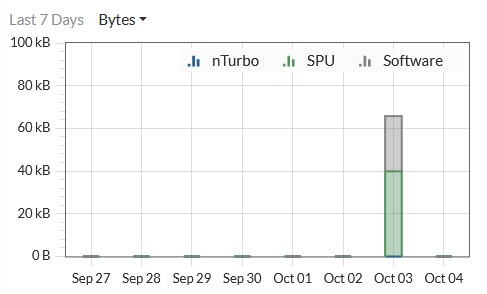
x3. In the above picture (open/edit a policy in Policy&Objects > FirewallPolicy) you see nTurbo, SPU and Software. Explain these three!
x4. Find a (scientific) article that measures SNORT on regular (off the shelf) CPU, or similar measurements.
x4a. What is the title of the article?
x4b. Summarize the findings in 2-3 sentences!
¶ 9b. Questions: What about SSL-traffic and https:// ?
Do only one of the following alternatives (XOR)
Alternative 1 - Preferred (hard)
Alt1: Submit a short how-to guide how you succeeded in mitigating a SQLi attack over a https connection (including screenshots)
Alternative 2 - Also acceptable (easy) Was: "Please don't"
Alt2a: Can you get a free signed https certificate on the Internet? If so, where?
Alt2b: Explain with a figure and text what a Man-in-the-Middle (MitM) Attack is!
Alt2c: Explain what a web server proxy is and how it can function with todays use of https. Also include a explanatory figure !
¶ 10. Mandatory homework (for the report)
(this might be done at home)
y1. Verify that you have Wireshark installed (https://www.wireshark.org/download.html)
y2. Find a PCAP file (Packet Capture File) that contains SQLi and XSS.
Question Where did you find it?
y2b. IF, big if, you can't Google and can't do AI (noob!) to find a PCAP-file, you can instead use your FortiGate to record all data traffic when you attack the webserver, and then save your own version of a PCAP-file (elite!)
y3. Which PDU in wireshark contains a SQL-Injection (SQLi) attack
Question Why is it a SQLi? Include screenshot!
y4. Question Which Wireshark-filter did U use to find it? Any extra commands??
y5. Which PDU in Wireshark contains a Cross-Site-Scripting (XSS) attack
Question Why is it a XSS? Include screenshot!
y6. Question Why is it a SQLi? Include screenshot!Which Wireshark-filter did U use to find it? Any extra commands??
y7. (Optional): Answer all the questions at https://www.malware-traffic-analysis.net/2014/11/16/index.html (Password? : infected_20141116 )
¶ 11. Cleanup
Erase the FortiGate, so it is clean for the next group, by pressing the >_ icon (top right corner)
Type: execute factoryreset
¶ Youtube
https://www.youtube.com/watch?v=E4qwpBxH5b4 Web application firewall (WAF) - firewall training (forti Tip)
https://youtu.be/Kn27rdcn7tk?si=tEP2QFdI28eB3p2l FortiGate WAF David Romero Trejo (No talking, music only)
https://community.fortinet.com/t5/FortiGate/Technical-Tip-How-to-collect-Web-application-firewall-WAF/ta-p/274390
https://community.fortinet.com/t5/FortiGate/Troubleshooting-Tip-How-to-investigate-if-WAF-is-not-generating/ta-p/196635